
Introduction
Couple photography has moved far beyond traditional filters and simple color adjustments. With modern artificial intelligence, an ordinary couple photograph can be transformed into a polished wallpaper with improved lighting, cleaner backgrounds, enhanced details, cinematic tones, and creative compositions. This has made AI editing software increasingly useful for people who want professional-looking results without spending hours learning complicated editing programs.
If you are looking for the best AI photo editing software for trending couple photo wallpaper editing, the right choice depends on the type of result you want. Some tools are designed for detailed professional editing, while others focus on quick AI enhancements, background changes, creative effects, and social-media-ready compositions.
Current AI photo editors increasingly include features such as generative editing, background replacement, intelligent masking, object removal, image enhancement, and automated retouching. Industry comparisons in 2026 also distinguish between professional editors such as Adobe Photoshop and Lightroom, beginner-friendly AI suites such as Luminar Neo, and browser-based options such as Canva and Pixlr.
This guide explains how to choose an AI editor for couple wallpapers, what features matter, how to create a premium-looking result, and what to consider before paying for an AI editing subscription.
What Is AI Couple Photo Wallpaper Editing?
AI couple photo wallpaper editing uses artificial intelligence to modify an existing photograph while preserving important elements such as faces, clothing, pose, and overall composition.
Instead of manually selecting every object or adjusting dozens of sliders, AI tools can identify subjects and automatically apply specific changes. For example, an editor may detect the couple, separate them from the background, improve lighting, remove distracting objects, and expand the image to fit a smartphone wallpaper.
This makes AI particularly useful when the original photograph is good but needs additional creative treatment.
Why AI Editing Works Well for Couple Wallpapers
A wallpaper needs to look attractive even when displayed on a relatively small screen. The main subjects should remain clear, the composition should not feel crowded, and important details should not be hidden behind icons or widgets.
AI editing tools can help achieve this by improving the overall composition and creating additional background space where necessary. Generative expansion is particularly useful when a horizontal couple photograph needs to be adapted into a vertical phone wallpaper.
Modern AI couple-photo tools also increasingly focus on preserving facial similarity while combining or creatively editing portraits. Recent 2026 comparisons show that dedicated couple-photo tools can generate shared scenes from separate reference photos, while full editors are better suited to remixing an existing couple photograph.
Features to Look for in the Best AI Photo Editing Software
The best choice is not necessarily the application with the largest number of effects. For couple wallpaper editing, practical AI capabilities are more important.
A strong editor should ideally provide intelligent background editing, portrait enhancement, object removal, image expansion, lighting controls, and high-resolution export. Advanced tools may also provide generative fill, masking, layers, RAW processing, or batch editing.
| Feature | Why It Matters for Couple Wallpapers |
|---|---|
| AI Background Editing | Creates cleaner and more attractive surroundings |
| Generative Expansion | Converts photos into wallpaper-friendly dimensions |
| Portrait Enhancement | Improves facial clarity and image quality |
| Object Removal | Removes distracting background elements |
| AI Relighting | Creates more balanced lighting |
| High-Resolution Export | Helps maintain quality on modern displays |
Professional software such as Photoshop and Lightroom remains strong for users who want extensive control, while simpler AI editors can be faster for casual creators. Current 2026 comparisons continue to place Photoshop among the strongest options for generative compositing and Lightroom among leading professional workflows.
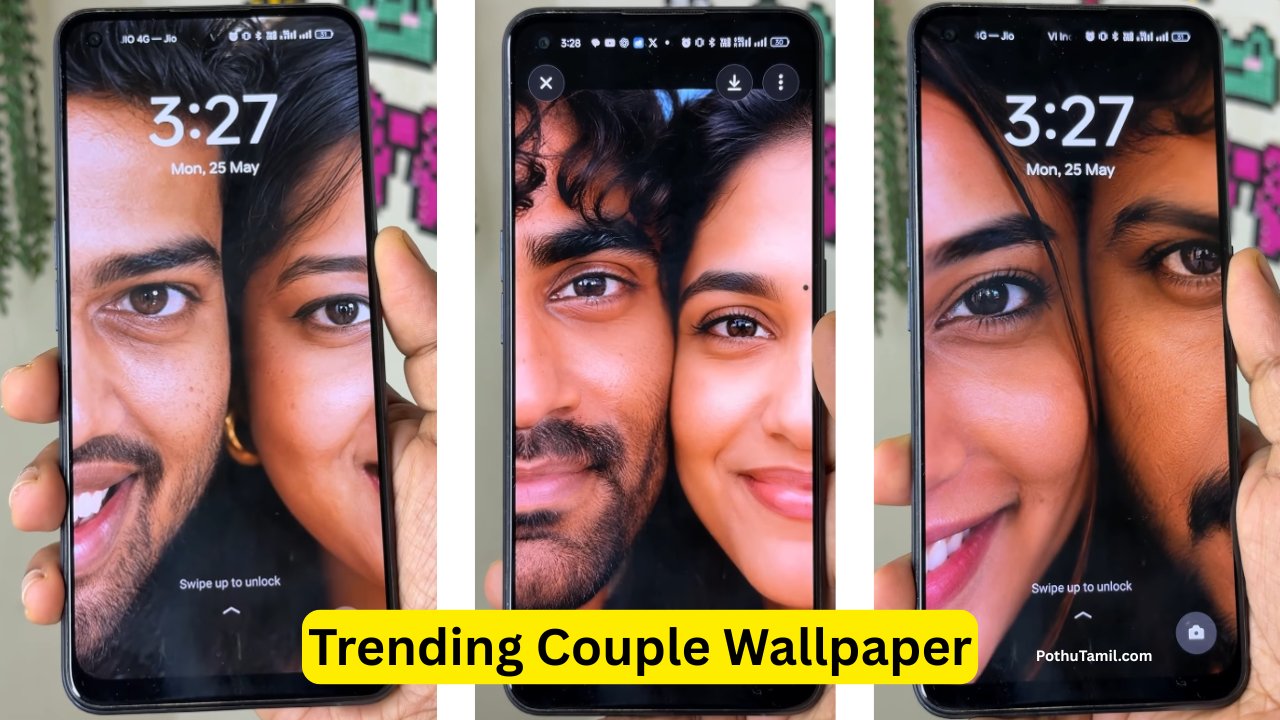
Creating a Trending Couple Wallpaper
The editing process should begin with a high-quality source photograph. A clear image with good facial visibility generally gives AI tools more information to work with.
After importing the photograph, the first step is usually composition. If the image does not have enough vertical space, an AI expansion feature can extend the background rather than simply cropping the couple.
The next stage is lighting. AI relighting can help balance bright and dark areas while maintaining the natural appearance of the subjects. Subtle adjustments usually look better than excessive effects.
Finally, users can apply a consistent color style, remove unwanted objects, sharpen important details, and export the finished image at a suitable resolution.
Prompt:
Create a photorealistic color photo, vertical 9:16, extreme close up. Half my face and half of my husband face pressed closely together, and sharing the same frame equally.add very tiny watermark of letter P on the down right corner
Faces are very close to the camera, and intimate contact.
Tight crop, one human eye+ one eye centered, perfectly aligned and both in sharp focus with that same intimate framing Frame tightly filled with faces, background barely visible.
Focus on eyes, skin and fur.
Soft natural or studio lighting, emphasizing realistic texture of skin and skin.
Warm natural color, no filters.
Ultra realistic, high detail, sharp focus, professional photo in 4k
Background and Scene Enhancement
The background has a major influence on the quality of a couple wallpaper. A cluttered environment can distract attention from the subjects, while a carefully edited background can make the photograph look more professional.
AI background tools can remove distractions, blur selected areas, replace scenery, or generate additional surroundings. Some applications also allow users to describe the desired environment through text prompts.
For a natural result, the replacement background should match the original lighting direction, perspective, and overall atmosphere.
Portrait Enhancement Without Overediting
Portrait enhancement should improve the photograph without making the couple look artificial.
AI editors can often improve sharpness, reduce image noise, balance exposure, and enhance facial details. However, aggressive skin smoothing or facial modification can make a photograph lose its natural character.
For wallpaper creation, subtle enhancement is usually preferable because the final image may be viewed frequently on a high-resolution smartphone display.
AI Wallpaper Composition
One of the most useful AI features for wallpaper creation is intelligent image expansion.
Suppose a couple photograph was originally captured in a horizontal format. Simply cropping it into a vertical wallpaper could cut off important parts of the scene. Generative expansion can instead create additional background around the existing photograph.
This approach allows the couple to remain properly positioned while providing space for smartphone interface elements.
The same technique can be useful when adapting photographs for tablets, desktop wallpapers, or social-media formats.
Free vs Paid AI Editing Software
Many AI photo editors offer free tools alongside paid subscriptions. Free versions can be sufficient for basic editing, but advanced AI features may require credits, subscriptions, or premium plans.
Professional software generally provides greater control and more extensive workflows, while consumer-focused applications often prioritize convenience.
| Category | Free AI Editor | Premium AI Editor |
| Basic Enhancements | Usually available | Included |
| Background Tools | Limited in some apps | More advanced |
| Generative Features | May have usage limits | Higher limits or expanded access |
| Export Options | May be restricted | Usually broader |
| Professional Controls | Limited | More extensive |
| Commercial Workflow | Often limited | Better suited to professional use |
Pricing changes frequently, so users should verify the current subscription and credit structure directly with the software provider before purchasing. For example, current market comparisons show substantial differences between professional subscriptions, AI-focused applications, and free browser editors.
Professional vs Beginner AI Editors
Professional editors are useful when you need detailed control over layers, masks, color correction, RAW images, and advanced compositing. They are particularly suitable for photographers, designers, agencies, and creators working with commercial projects.
Beginner-focused AI editors are better when speed and simplicity matter more than detailed manual control. They can provide automated enhancement, background editing, and creative effects with fewer steps.
For a single couple wallpaper, a simple editor may be sufficient. For professional photography or repeated commercial work, investing in a more capable editing platform can provide greater long-term value.
Privacy and Photo Security
Couple photographs can contain personal information, so privacy should not be overlooked when using cloud-based AI editors.
Before uploading personal photographs, review the service’s privacy policy and understand how images are processed, stored, and deleted. Avoid uploading highly sensitive photographs to unfamiliar services simply because they offer a free AI effect.
Downloading software from official sources and keeping applications updated also reduces unnecessary security risks.
Copyright and Responsible Editing
AI editing should be used responsibly. If the photograph belongs to someone else, users should have permission before making significant modifications or publishing the edited image.
For commercial projects, additional considerations may include image licensing, model permissions, music or artwork appearing in the photograph, and the terms associated with the AI editing service.
Using your own photographs or images for which you have appropriate rights is the simplest approach.
Best Use Cases
AI couple wallpaper editing can be useful for personal smartphone wallpapers, anniversary designs, wedding photography, social-media content, digital albums, creative projects, and personalized gifts.
Professional photographers can also use AI tools to speed up repetitive editing tasks while maintaining greater manual control over important images. Current photography software comparisons emphasize AI-assisted masking, enhancement, batch workflows, and generative editing as increasingly important parts of professional production.
How to Choose the Right Software
Before subscribing to an AI editing platform, consider the actual work you need to perform.
If your main requirement is quick couple wallpaper creation, prioritize ease of use, AI background editing, generative expansion, portrait enhancement, and high-resolution exports.
If you regularly edit hundreds of photographs, look for batch processing, RAW support, catalog management, and professional color controls.
If you’re creating images for a business, also evaluate commercial licensing, cloud storage, account management, and subscription limits.
Frequently Asked Questions
What is the best AI photo editing software for couple wallpapers?
There is no single best option for everyone. Professional editors such as Photoshop and Lightroom are suitable for advanced control, while simpler AI platforms can be more convenient for quick creative edits. The right choice depends on the workflow and features required.
Can AI turn a normal couple photo into a wallpaper?
Yes. AI editors can resize, crop, expand backgrounds, enhance portraits, and modify compositions so that an existing couple photograph works better as a phone or desktop wallpaper.
Can AI change the background of a couple photo?
Many modern AI editors provide background removal, replacement, blur, or generative expansion features. The exact capabilities vary by software.
Is paid AI photo editing software worth it?
It can be worthwhile for users who regularly edit photographs or need advanced features. Casual users may find that a free version provides enough functionality for occasional wallpaper creation.
Does AI editing reduce photo quality?
It can either improve or reduce quality depending on the tool, source image, processing method, and export settings. Using a high-quality original and an appropriate export resolution generally produces better results.
Final Verdict
The best AI photo editing software for trending couple photo wallpaper editing should combine intelligent enhancement with enough creative control to produce a natural, high-quality result. Features such as AI background replacement, generative expansion, portrait enhancement, object removal, relighting, and high-resolution export are particularly valuable for this type of project.
For quick personal wallpapers, an easy AI editor may be all you need. For photographers, designers, and commercial creators, professional platforms with advanced AI workflows can offer substantially more control and productivity.
The most important step is to choose software based on your actual editing requirements rather than simply selecting the application with the most effects. With a high-quality source photograph, thoughtful composition, and moderate AI adjustments, you can create a polished couple wallpaper without making the image look artificial.
Ji