
An AWS video streaming service provides businesses, developers, broadcasters, and content creators with cloud-based tools to process, store, and deliver video content over the internet. Amazon Web Services (AWS) offers a collection of media services that support live broadcasts, video-on-demand platforms, online education, corporate training, and digital entertainment. With the right architecture, businesses can build an AWS streaming video solution that serves viewers across different devices while adapting to changing audience demand.
As video becomes an increasingly important part of digital communication, organizations need reliable infrastructure for uploading, encoding, storing, and delivering media. AWS streaming service options allow businesses to combine video-processing tools, cloud storage, content delivery networks, and security features according to their requirements. Rather than maintaining every component on local servers, organizations can use managed cloud services to build flexible video delivery workflows.
What Is an AWS Video Streaming Service?
An AWS video streaming service is a cloud-based solution built using AWS infrastructure and media technologies to deliver live or prerecorded video to viewers. These solutions can support everything from a small video library to large-scale streaming platforms that serve audiences across multiple regions.
AWS provides dedicated media services for different stages of the streaming process. AWS Elemental MediaLive handles live video encoding, AWS Elemental MediaConvert processes prerecorded video files, AWS Elemental MediaPackage prepares video for delivery, and Amazon CloudFront distributes content through a global content delivery network. Amazon S3 can be used to store video files and processed media assets.
These services can operate independently or as part of a connected workflow. The appropriate combination depends on whether the application requires live streaming, video-on-demand playback, interactive video, advertising, or secure distribution. <Cite refs={[“turn707259search0″,”turn707259search4”]}/>
How Does AWS Streaming Video Work?
An AWS streaming video workflow typically begins when video content enters the cloud from a camera, production system, recording device, or uploaded media file. The video is then processed into formats suitable for playback across supported devices and network conditions.
For live broadcasts, AWS Elemental MediaLive can encode an incoming feed into multiple quality levels. AWS Elemental MediaPackage can prepare the resulting streams for compatible playback formats, while Amazon CloudFront delivers the video to viewers.
For prerecorded content, the workflow is different. Video files can be stored in Amazon S3 and processed using AWS Elemental MediaConvert. The resulting files or streaming packages can then be delivered through CloudFront when viewers request them.
This architecture allows businesses to separate video processing, storage, and delivery instead of relying on a single server to perform every task. It also provides flexibility to add security, monitoring, automation, and monetization features as the application grows. <Cite refs={[“turn707259search3″,”turn707259search4”]}/>
AWS Media Streaming Services and Their Features
AWS offers several media services designed for different streaming requirements. Understanding their roles can help businesses choose a suitable architecture without paying for unnecessary components.
AWS Elemental MediaLive
AWS Elemental MediaLive is a managed live video encoding service. It converts live video inputs into streaming outputs that can be delivered to televisions, browsers, mobile applications, and other supported devices.
It is useful for live sports, conferences, news broadcasts, online events, and other situations where viewers need to watch content as it happens. MediaLive can create multiple output renditions so viewers with different internet speeds can receive an appropriate stream.
AWS Elemental MediaConvert
AWS Elemental MediaConvert is designed for file-based video processing. It can transcode prerecorded videos into formats and quality levels suitable for online distribution.
This service is useful for video-on-demand libraries, educational platforms, entertainment services, and businesses that publish recorded content. MediaConvert can prepare video assets for playback across different devices without requiring an organization to manage its own encoding infrastructure.
AWS Elemental MediaPackage
AWS Elemental MediaPackage prepares and packages video for distribution. It supports live and on-demand workflows and can help provide compatible streaming formats and content-protection capabilities.
For businesses that need controlled access to premium video, MediaPackage can be part of a workflow that includes digital rights management and authorized content delivery.
Amazon CloudFront
Amazon CloudFront is a content delivery network that distributes video and other web content through a global network of edge locations. It helps deliver content efficiently to viewers and reduces repeated requests to the original content source through caching.
CloudFront is particularly important when an AWS streaming service needs to reach viewers across different locations. Its role is to distribute prepared content; video generally needs to be encoded and packaged appropriately before playback. <Cite refs={[“turn707259search5″,”turn707259search6”]}/>
AWS Streaming Service for Live Video
Live streaming requires video to be processed and delivered while an event is taking place. This creates additional requirements for reliability, encoding, delivery speed, and handling sudden increases in viewer numbers.
An AWS streaming service for live video can combine MediaLive, MediaPackage, and CloudFront to build a workflow that receives a live feed, creates compatible streaming outputs, and distributes them to viewers.
This setup can support virtual conferences, live product launches, sports coverage, religious services, online classes, and corporate events. Businesses can also incorporate authentication and content-protection measures when streams are intended for a restricted audience.
For applications where viewers need to interact with live video, Amazon Interactive Video Service may also be relevant. It provides managed capabilities for building interactive live-streaming experiences in websites and applications. <Cite refs={[“turn707259search3″,”turn707259search7”]}/>
Streaming Video on AWS for Video-on-Demand Platforms
Streaming video on AWS is not limited to live broadcasts. Businesses can also build video-on-demand platforms where viewers select and watch prerecorded content whenever they want.
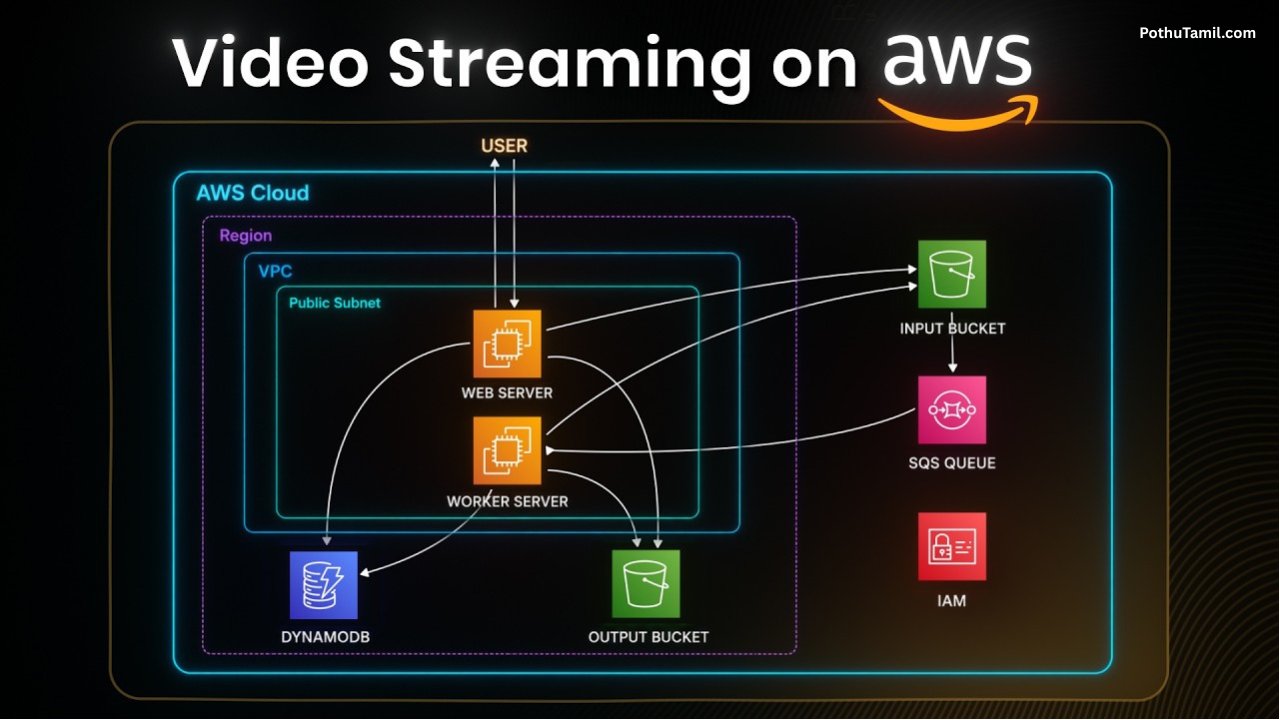
In a typical video-on-demand workflow, source files are stored in Amazon S3 and processed using MediaConvert. The processed video is then made available in suitable streaming formats, with CloudFront delivering the content to viewers.
This approach can support online course libraries, subscription video platforms, company training portals, product demonstrations, recorded webinars, and entertainment websites.
Businesses can also integrate application services, databases, and authentication systems to manage user accounts, subscriptions, viewing permissions, and content catalogs. This makes AWS useful for organizations that need more control over how video content is organized and delivered. <Cite refs={[“turn707259search0″,”turn707259search4”]}/>
AWS Video Streaming for Businesses
Businesses can use AWS video streaming to improve communication, deliver training, distribute digital products, and provide video-based customer experiences.
Educational organizations can publish recorded lessons and stream live classes. Media companies can distribute entertainment content, while businesses can provide internal training videos to employees across multiple offices. Marketing teams can also use streaming infrastructure for product demonstrations, online events, and promotional content.
For larger organizations, AWS can integrate with analytics, monitoring, security, and automation services. These integrations help teams monitor infrastructure, manage access, and automate parts of the video-processing workflow.
Organizations should still plan their architecture around expected viewer numbers, video quality, availability requirements, and content-protection needs. A simple recorded-video website may require far fewer components than a global live-streaming platform.
AWS Video Streaming and Content Security
Security is an important part of any streaming architecture, especially when the video includes paid content, confidential business information, or private training material.
AWS video streaming solutions can incorporate identity and access management, secure storage permissions, HTTPS delivery, and access restrictions through suitable services. CloudFront can also work with signed URLs or signed cookies to restrict access to authorized viewers. MediaPackage supports content-protection workflows that may include digital rights management, depending on the configuration.
Businesses should avoid making private video files publicly accessible unless that is intentional. Authentication, authorization, encryption, logging, and appropriate access policies should be considered during system design rather than added only after a platform has launched. <Cite refs={[“turn707259search3″,”turn707259search6”]}/>
AWS Media Streaming Costs and Pricing
The cost of AWS media streaming depends on how the services are configured and how much video is processed, stored, and delivered. There is no single fixed price for every AWS streaming service because different applications use different combinations of infrastructure.
MediaLive pricing depends on factors such as running inputs, outputs, and selected features. MediaPackage charges vary according to the relevant live or on-demand packaging model and the amount of video processed and delivered. CloudFront charges depend on applicable data-transfer and request pricing, while storage and transcoding introduce additional costs where used. <Cite refs={[“turn707259search2″,”turn707259search10”]}/>
For example, a short live event with a limited audience has a different cost profile from a 24-hour channel serving thousands of viewers. Higher video bitrates, additional output qualities, longer streaming durations, and greater viewer traffic can all affect the final bill.
Businesses should use the official AWS Pricing Calculator and review the current pricing pages for the services they plan to use. Cost estimates should include encoding, packaging, storage, delivery, logging, and any additional services required by the architecture.
AWS Streaming Video vs Traditional Streaming Infrastructure
Traditional streaming infrastructure may require organizations to purchase and maintain encoding equipment, storage systems, delivery servers, and networking capacity. This can provide direct control, but it also introduces hardware costs, maintenance responsibilities, and capacity-planning requirements.
AWS streaming video infrastructure provides an alternative in which organizations can use cloud services and scale selected resources according to their workloads. Managed media services reduce the need to operate every component directly, while CloudFront can help distribute content to geographically dispersed viewers.
However, cloud infrastructure is not automatically cheaper for every workload. Organizations with predictable, continuous traffic should compare cloud usage costs with other deployment models. The best option depends on scale, operational expertise, reliability requirements, and the level of control the organization needs.
How to Choose the Right AWS Streaming Service
Choosing the right AWS streaming service begins with identifying the type of video experience the application must provide. Live broadcasts may require MediaLive and MediaPackage, while prerecorded libraries may use S3 and MediaConvert. CloudFront can support distribution in either case.
Businesses should also consider supported playback formats, video quality, expected audience size, access restrictions, regional availability, and monitoring requirements. If the application needs interactive live video, a dedicated service such as Amazon Interactive Video Service may be more appropriate than assembling every component independently.
Testing the workflow with realistic video files and traffic estimates can help reveal performance issues and unexpected costs before a public launch. Reviewing AWS documentation and pricing information is also important because service features and prices can change.
Conclusion
An AWS video streaming service gives businesses and developers a flexible foundation for building live broadcasts and video-on-demand applications. By combining media processing, cloud storage, packaging, and content delivery services, organizations can create streaming workflows tailored to their technical and business needs.
Whether a project involves an AWS streaming video platform for online education, an AWS streaming service for live events, or streaming video on AWS for a large media library, selecting the right services is essential for balancing quality, security, performance, and cost.
With the right architecture, AWS media streaming can support a wide range of digital video experiences. Businesses should evaluate their requirements, estimate usage-based charges, and test their delivery workflow before scaling to a larger audience.