

Adobe audio editor tools provide a range of features for recording, editing, enhancing, and producing digital audio. Whether you are a beginner creating a podcast, a content creator editing voiceovers, or a professional working with music and sound, Adobe offers software designed to handle different audio production needs.
Adobe Audition is one of the company’s main applications for professional audio editing. It includes tools for cleaning recordings, removing unwanted noise, mixing multiple tracks, and preparing audio for videos, podcasts, and other projects. Understanding how Adobe audio editing software works can help you choose the right audio tool for your creative or professional requirements.
What Is Adobe Audio Editor?
Adobe audio editor generally refers to Adobe’s audio editing software, particularly Adobe Audition. It is a digital audio workstation (DAW) designed for recording, editing, mixing, and restoring audio.
Adobe Audition provides tools for working with individual audio files as well as multitrack projects. Users can edit voice recordings, remove background noise, adjust sound levels, apply audio effects, and combine different recordings into a finished production.
It is useful for podcasters, musicians, video editors, broadcasters, and other professionals who need more control over their audio quality. The software also works with other applications in the Adobe Creative Cloud ecosystem.
What Is Adobe Audition?
Adobe Audition is a professional audio workstation that supports detailed sound editing and multitrack production. It provides a workspace for editing recordings, improving sound quality, and creating audio projects.
The software includes waveform editing for working with individual audio files and a multitrack environment for combining voice recordings, music, sound effects, and other audio elements.
Adobe Audition is particularly useful when a project requires precise editing and audio cleanup. Users can remove unwanted sections, adjust volume, apply effects, and prepare recordings for publishing or further video production.
Key Features of Adobe Audio Editing Tools
Waveform Audio Editing
Waveform editing allows users to work directly with an individual audio recording. Adobe Audition provides controls for selecting, cutting, copying, moving, and adjusting sections of an audio file.
This is useful when editing interviews, voiceovers, music recordings, and other standalone audio tracks. Users can remove unnecessary pauses, correct mistakes, and improve the overall flow of a recording.
Multitrack Audio Editing
The multitrack workspace allows users to combine multiple audio recordings in one project. For example, a podcast may contain separate tracks for the host, guest, background music, and sound effects.
Each track can be adjusted independently, making it easier to control volume, timing, and effects. This feature is useful for creating professional audio mixes without having to combine every recording into a single file at the beginning.
Noise Reduction and Audio Restoration
Background noise can reduce the quality of an otherwise good recording. Adobe Audition includes audio restoration tools that can help reduce unwanted sounds such as steady background noise, hum, clicks, and other recording problems.
The effectiveness of noise reduction depends on the recording and the type of interference. Excessive processing can make voices sound unnatural, so it is important to listen carefully while adjusting the settings.
Audio Effects and Mixing
Adobe Audition provides effects for adjusting equalization, compression, dynamics, reverb, and other sound characteristics. These tools help users balance different recordings and improve the listening experience.
For example, equalization can help adjust the tonal balance of a voice, while compression can control variations in volume. Combining these tools carefully can produce a more consistent and polished audio mix.
How to Use Adobe Audition for Audio Editing
The editing process usually begins by creating a project and importing the required audio files. Users can open an individual recording in the waveform editor or add several files to a multitrack session.
After importing the audio, unnecessary sections can be removed and recording problems can be corrected. Users can then apply suitable effects, adjust sound levels, and arrange the tracks according to the project requirements.
Once the editing is complete, the audio can be mixed and exported in a supported format. The best export settings depend on the intended use, such as podcast publishing, video production, online streaming, or professional distribution.
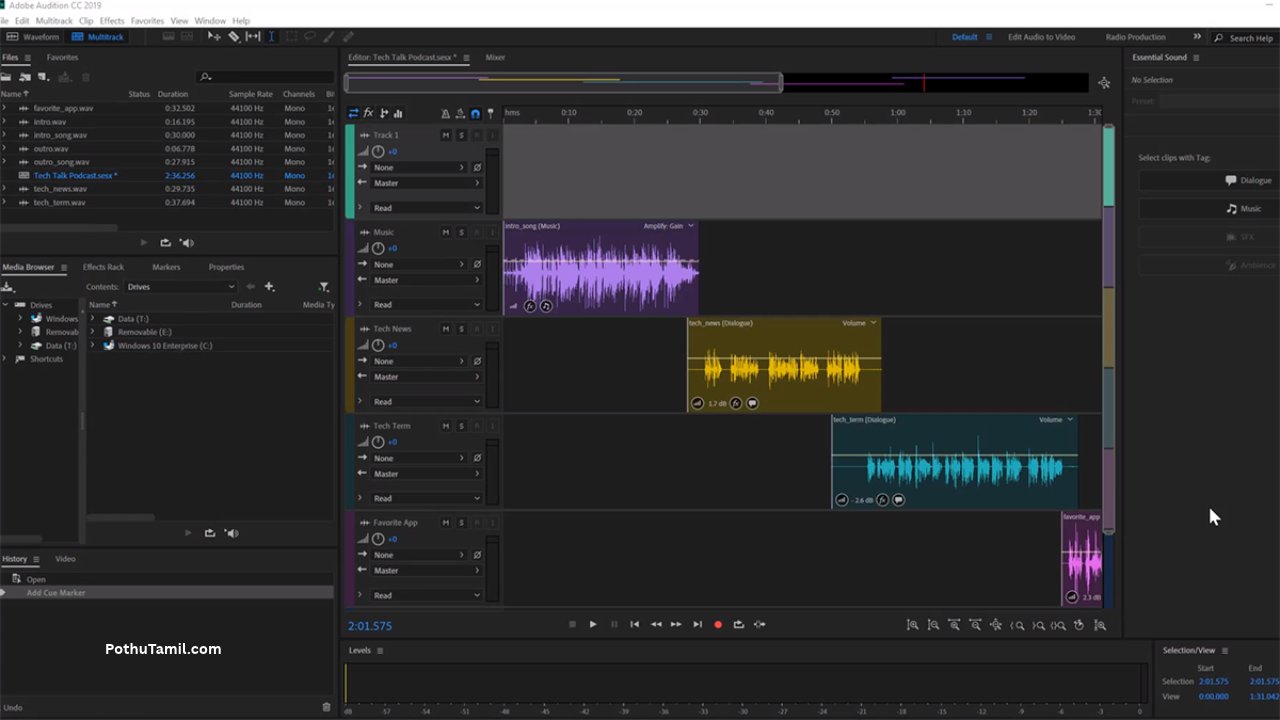
Adobe Audio Editor for Podcast Production
Podcasters often need to edit interviews, remove pauses, improve voice clarity, and combine speech with background music. Adobe Audition offers tools that can support these tasks within a single audio production environment.
Users can record or import voice tracks, organize separate speakers on different tracks, and apply effects to improve consistency. Noise reduction and equalization can also help address common recording issues.
For regular podcast production, a structured editing workflow can save time. Keeping original recordings, using separate tracks, and applying effects consistently makes it easier to revise episodes and maintain a recognizable sound.
Adobe Audio Editor for Video Editing
Audio quality plays an important role in video production. Poor voice recordings, inconsistent volume, and distracting background noise can affect the overall viewing experience.
Adobe Audition can be used to prepare dialogue, music, and sound effects before they are incorporated into a video project. It also works alongside Adobe Premiere Pro, allowing video editors to use dedicated audio tools when a project requires more detailed sound editing.
This workflow is useful for YouTube videos, interviews, advertisements, tutorials, and professional video productions. The combination of video editing and dedicated audio software can provide greater control over the final result.
Adobe Audio Editor vs Other Audio Editing Software
Adobe Audition is not the only option available for editing digital audio. Several other applications offer recording, mixing, and audio restoration features.
Audacity is a popular audio editor for users who want a free, open-source solution. It is suitable for basic recording, editing, and audio processing.
REAPER is a flexible digital audio workstation used for multitrack recording, mixing, and music production. Its customization options make it useful for different audio workflows.
Apple Logic Pro is designed for music production and includes tools for recording, arranging, and mixing music on supported Apple devices.
The best choice depends on the type of work, operating system, budget, and level of control required. Adobe Audition is particularly relevant for users who need dedicated audio editing and already work with other Adobe applications.
Is Adobe Audition Free?
Adobe Audition is generally offered as a paid application through Adobe subscription plans rather than as a permanently free full version. Users should check Adobe’s official website for current pricing, available plans, regional availability, and trial options.
A subscription may be suitable for professionals who regularly edit audio or use multiple Adobe applications. However, occasional users may prefer a free audio tool if they only need basic recording and editing features.
Before subscribing, consider how frequently you will use the software and whether its advanced features are necessary for your projects.
Online Audio Editor vs Adobe Audition
Online audio editors allow users to make basic changes through a web browser without installing a full desktop application. They can be convenient for trimming recordings, combining files, or making quick adjustments.
Adobe Audition provides a more extensive desktop editing environment for detailed waveform work, multitrack mixing, and audio restoration. It may be a better option when projects involve several recordings or require advanced processing.
Online tools are convenient for simple tasks, while dedicated software is often more appropriate for complex production workflows. Users should also consider file-size limits, supported formats, privacy policies, and whether an internet connection is required.
Who Should Use Adobe Audio Editing Software?
Adobe audio editing software can be useful for content creators, podcasters, video editors, musicians, and businesses that produce audio content.
Beginners can use it to learn recording and editing techniques, although the range of available controls may take time to understand. Experienced users can benefit from its detailed editing tools and integration with other creative applications.
Businesses may also use professional audio editing software to produce training materials, advertisements, interviews, and branded content. The right tool depends on the complexity of the project and the team’s production requirements.
Conclusion
Adobe audio editor tools provide useful capabilities for recording, editing, mixing, and improving digital sound. Adobe Audition is a professional option for users who need waveform editing, multitrack production, noise reduction, and detailed audio processing.
Whether you are producing podcasts, preparing voiceovers, editing video sound, or creating other audio content, the right software can make your workflow more efficient. By comparing Adobe Audition with other audio tools and considering your project requirements, you can choose an audio editing solution that delivers the features and sound quality you need.