
What Is Snapchat Lens?
A Snapchat Lens is an augmented reality (AR) camera effect that transforms how people look or changes the environment captured through a smartphone camera. It can add virtual objects, animated characters, facial transformations, makeup effects, and interactive digital elements to photographs and videos.
Unlike traditional photo filters, which mainly adjust image colors, brightness, or appearance, Snapchat Lenses can respond to facial expressions, body movements, and environmental information. This makes them more interactive and suitable for different creative applications.
For example, a user can activate a face Lens that adds virtual sunglasses and watch the glasses move naturally as they turn their head. Another Lens might place a virtual character inside a room or transform an ordinary selfie into an animated portrait.
Snapchat offers different Lenses for entertainment, communication, and creative expression. Independent creators and developers can also build their own experiences using Snapchat’s AR development tools.
Why Are Snapchat Lenses Popular?
Snapchat Lenses have become popular because they make everyday camera experiences more entertaining and personalized.
Some important reasons include:
- Creative expression: Users can experiment with different appearances, animations, and camera effects.
- Interactive experiences: Certain Lenses respond to facial expressions and movements.
- Easy sharing: Users can share photos and videos created with Lenses.
- Personalization: Different effects allow users to create content that matches their interests.
- Content creation: Influencers and creators can produce engaging social media videos.
- Business applications: Companies can use AR experiences to introduce products and promote services.
These benefits make Snapchat Lens technology useful for casual users, professional creators, and businesses.
How Does Snapchat Lens Work?
Snapchat Lens technology combines several technologies to create real-time augmented reality experiences. Depending on the effect, these technologies may include computer vision, facial tracking, 3D graphics, artificial intelligence, and image processing.
When a user selects a Lens, Snapchat processes the camera input and applies the visual elements associated with that particular experience.
For example, a face Lens needs to understand where the user’s face is positioned. A World Lens may need to recognize surfaces and the surrounding environment so that virtual objects appear in suitable locations.
Facial Tracking Technology
Facial tracking is one of the most important technologies used in face-based Snapchat Lenses.
It helps identify facial landmarks such as the eyes, nose, mouth, and other important facial areas. The Lens can then position digital objects according to those points.
This technology supports effects such as:
- Virtual glasses and sunglasses.
- Animal ears and animated masks.
- Facial transformations.
- Digital makeup.
- Cartoon character effects.
- Animated facial accessories.
Because the effects can respond to movement, users can create videos without manually adjusting the position of every digital object.
Augmented Reality Technology
Augmented reality combines digital elements with real-world camera views.
World Lenses use AR technology to introduce virtual objects into the environment. For example, users may be able to place a virtual character on a table or display an animated object inside a room.
This technology is also useful for product visualization, interactive advertising, and virtual demonstrations.
Artificial Intelligence and Machine Learning
Artificial intelligence can support more advanced visual effects and creative experiences.
Some AI Lenses can transform photographs, generate imaginative visual styles, or modify the appearance of a scene.
Snapchat also provides AI-powered creative experiences that users can discover through available Lens features. Access and usage limits can vary according to the experience, region, and subscription eligibility.
3D Graphics and Animation
Three-dimensional graphics allow developers to create virtual objects and animated characters that appear inside camera experiences.
A developer might create a 3D animal character, prepare its animations, and use suitable tracking technology to make it interact with the camera environment.
These elements make Snapchat Lenses more engaging than ordinary static image overlays.
Different Types of Snapchat Lenses
Snapchat offers different types of Lenses designed for entertainment, personalization, and augmented reality experiences. Understanding these categories helps users discover effects that match their interests.
1. Face Lenses
Face Lenses are among the most recognizable Snapchat camera effects. They apply visual transformations directly to a person’s face through facial tracking technology.
Popular examples include:
- Animal face transformations.
- Cartoon and animated appearances.
- Virtual glasses and accessories.
- Beauty and makeup effects.
- Funny facial expressions.
- Character-inspired transformations.
These Lenses are particularly useful for selfies, short videos, and entertaining conversations.
2. World Lenses
World Lenses use the outward-facing camera to introduce virtual objects and characters into real-world surroundings.
For example, a user might place an animated character on a desk or display a virtual object in a living room.
World Lenses are useful for interactive entertainment, visual storytelling, and product demonstrations.
3. Beauty and Makeup Lenses
Beauty Lenses allow users to experiment with digital makeup and appearance-related effects.
Depending on the Lens, available effects may include virtual lipstick, blush, eyelashes, skin adjustments, and other cosmetic elements.
These experiences are useful for people who want to experiment with different visual styles before capturing a photograph.
4. AI Lenses
AI Lenses use artificial intelligence to create or transform visual content.
Some experiences can generate creative portrait styles or modify images according to a particular theme.
Users can discover eligible AI Lenses through Lens Explorer, Snapcodes, or shared Lens links. Some AI experiences may have usage limits or subscription-related features.
5. Interactive Game Lenses
Interactive Game Lenses turn the smartphone camera into an entertainment experience.
Some games use facial movements, gestures, or touch interactions. Others introduce virtual objects into the surrounding environment.
They can be useful for creating entertaining short videos and engaging with friends.
6. 3D Animation Lenses
3D Animation Lenses introduce animated digital objects into camera experiences.
Developers can use 3D models, textures, and animations to create characters and interactive objects that respond to users.
These experiences can be more complex than traditional face effects and may require additional development skills.
How to Find and Use Snapchat Lenses
Finding and using Snapchat Lenses is simple. Users can access available camera effects directly from the Snapchat application.
Follow these steps:
- Open Snapchat on your Android smartphone or iPhone.
- Navigate to the camera screen.
- Activate the Lens carousel near the camera capture button.
- Swipe through the available Lens options.
- Select the Lens you want to use.
- Follow the instructions displayed on the screen.
- Position your face or camera according to the selected effect.
- Tap the capture button to take a photo.
- Press and hold the capture button to record a video.
- Preview your Snap and share it with friends if you like the result.
The available Lenses may change over time. Some effects may also require an internet connection or a compatible device.
How to Discover New Snapchat Lenses
Lens Explorer is one of the main features for discovering additional camera effects.
To explore new Lenses:
- Open the Snapchat camera.
- Activate the Lens carousel.
- Tap the magnifying glass icon to open Lens Explorer.
- Browse the available Lens collections.
- Select an interesting Lens to try it.
- Tap the heart icon to add suitable Lenses to your favourites.
You may also discover Lenses through friends’ Snaps, shared Lens links, and special Snapcodes. Some experiences are available only for limited periods.
Snapchat’s support documentation explains these discovery options and how users can save their favourite Lenses.
Best Snapchat Lens Features
Snapchat Lenses provide several features that make camera-based content creation more interactive.
| Feature | Description | Main benefit |
|---|---|---|
| Face Tracking | Recognizes facial movements | Realistic face effects |
| World Tracking | Supports virtual objects in surroundings | Interactive AR |
| 3D Objects | Introduces virtual elements | Creative experiences |
| AI Effects | Supports AI-powered transformations | Personalized visuals |
| Lens Explorer | Helps users discover Lenses | Easier exploration |
| Lens Sharing | Allows users to share experiences | Content accessibility |
| Lens Creation | Supports custom AR development | Original effects |
Real-Time Camera Effects
Users can preview a Lens before capturing a photograph or video. They can change their expressions, move their heads, and experiment with different camera positions.
This makes it easier to create content without spending additional time editing every image.
Creative Content Sharing
Snapchat allows users to share their Lens creations through its available communication and content-sharing features.
This encourages users to experiment with different effects and share personalized visual messages.
Custom AR Experiences
Creators can build their own experiences rather than depending entirely on existing camera effects.
Custom Lenses can include animated characters, virtual products, interactive games, and branded experiences.
How to Create Your Own Snapchat Lens
Creating a custom Snapchat Lens is an interesting opportunity for people who enjoy graphic design, animation, and augmented reality development.
Snapchat provides different creation tools for beginners and professional developers. The appropriate method depends on the complexity of the experience you want to build.
Step 1: Choose Your Lens Idea
Start by deciding what type of Lens you want to create.
Some possible ideas include:
- A virtual glasses or sunglasses effect.
- An animated animal face.
- A virtual makeup experience.
- A 3D character animation.
- An interactive camera game.
- A branded product demonstration.
A clear concept makes it easier to select the appropriate development tools.
Step 2: Choose a Creation Platform
Lens Studio is Snapchat’s main platform for developing advanced AR experiences.
Snapchat also provides mobile and web-based creation options for supported workflows. Beginners can explore templates and simple creative tools, while professional developers can use the desktop application.
Step 3: Prepare Your Visual Assets
Prepare the images, textures, 3D objects, and animations required for your project.
For example, a virtual glasses Lens needs suitable graphics that can be positioned around the user’s face.
A more advanced experience may require animated characters, environmental objects, and additional visual elements.
Step 4: Configure Tracking and Interactions
Choose the appropriate tracking features for your Lens.
Face-based effects may require facial tracking, while environmental experiences may need world tracking.
Make sure that virtual elements appear in suitable positions and respond naturally to user interactions.
Step 5: Test Your Lens
Preview the Lens using the available development tools.
Check the positioning of visual elements, animation quality, and performance.
Testing under different lighting conditions and camera angles can help identify problems before publishing.
Step 6: Publish Your Lens
After completing development, follow the publishing process in Lens Studio.
The Lens must meet Snapchat’s technical and content requirements. Submitted experiences may undergo automated checks and review before becoming available to Snapchat users.
A useful Lens name, clear preview image, and appropriate instructions can help users understand the experience.
What Is Lens Studio?
Lens Studio is Snapchat’s AR development platform for creating augmented reality experiences.
It provides tools for designing, testing, and publishing camera effects that can run through supported Snap platforms.
Creators can develop face Lenses, World Lenses, interactive games, 3D experiences, and other creative projects.
Important Lens Studio Capabilities
| Capability | How it helps |
|---|---|
| Face Tracking | Develops facial effects |
| Hand Tracking | Creates gesture-based interactions |
| Body Tracking | Supports movement-based experiences |
| World Tracking | Places virtual objects in environments |
| 3D Assets | Builds virtual characters and objects |
| Animation | Adds movement to visual elements |
| Visual Scripting | Supports interactive logic |
| AI Tools | Helps create advanced visual experiences |
Is Lens Studio Free?
Snapchat describes Lens Studio as a free AR creation platform. Its desktop application supports professional development, while available mobile and web tools provide additional creation options.
The available features depend on the platform and development workflow.
Do You Need Coding Skills?
Not every Snapchat Lens requires programming knowledge.
Beginners can use templates and visual creation tools to understand the basics of AR development.
However, advanced experiences may benefit from knowledge of:
- JavaScript or TypeScript.
- 3D modelling.
- Animation.
- Graphic design.
- Visual scripting.
- Augmented reality development.
Learning these skills can help developers create more sophisticated projects.
For official tutorials, software information, and development documentation, visit Snapchat Lens Studio.
Best Software for Professional Snapchat Lens Development
Professional AR experiences may require additional software for creating 3D models, images, textures, and animations.
Different applications support different stages of the creative process.
| Software | Main purpose | Suitable users |
|---|---|---|
| Blender | 3D modelling and animation | AR designers |
| Adobe Photoshop | Image editing and textures | Graphic designers |
| Adobe Illustrator | Vector graphics | Digital artists |
| Lens Studio | Snapchat AR development | Lens creators |
| Adobe After Effects | Motion graphics | Video creators |
| Substance 3D Painter | 3D texturing | 3D artists |
Blender for 3D AR Objects
Blender is a 3D creation application used for modelling, animation, and visual design.
Developers can use it to prepare virtual objects and characters for AR projects.
For example, someone developing an animated character Lens may create the character model and animations in Blender before importing suitable assets into their AR development project.
Adobe Photoshop for Visual Design
Adobe Photoshop is useful for preparing images, textures, and graphic elements.
Creators can use it to design visual assets for custom camera experiences.
For example, a developer might prepare textures for virtual accessories or create decorative images for a particular Lens.
Adobe Illustrator for Vector Graphics
Adobe Illustrator supports vector-based graphic design.
It can help creators develop logos, icons, illustrations, and other scalable design elements for their projects.
Businesses and creative agencies may find vector assets useful when developing branded AR experiences.
Adobe After Effects for Motion Graphics
Adobe After Effects is used for animation and motion graphics.
It can support promotional videos, visual demonstrations, and other creative materials associated with AR projects.
It complements AR development rather than replacing Lens Studio.
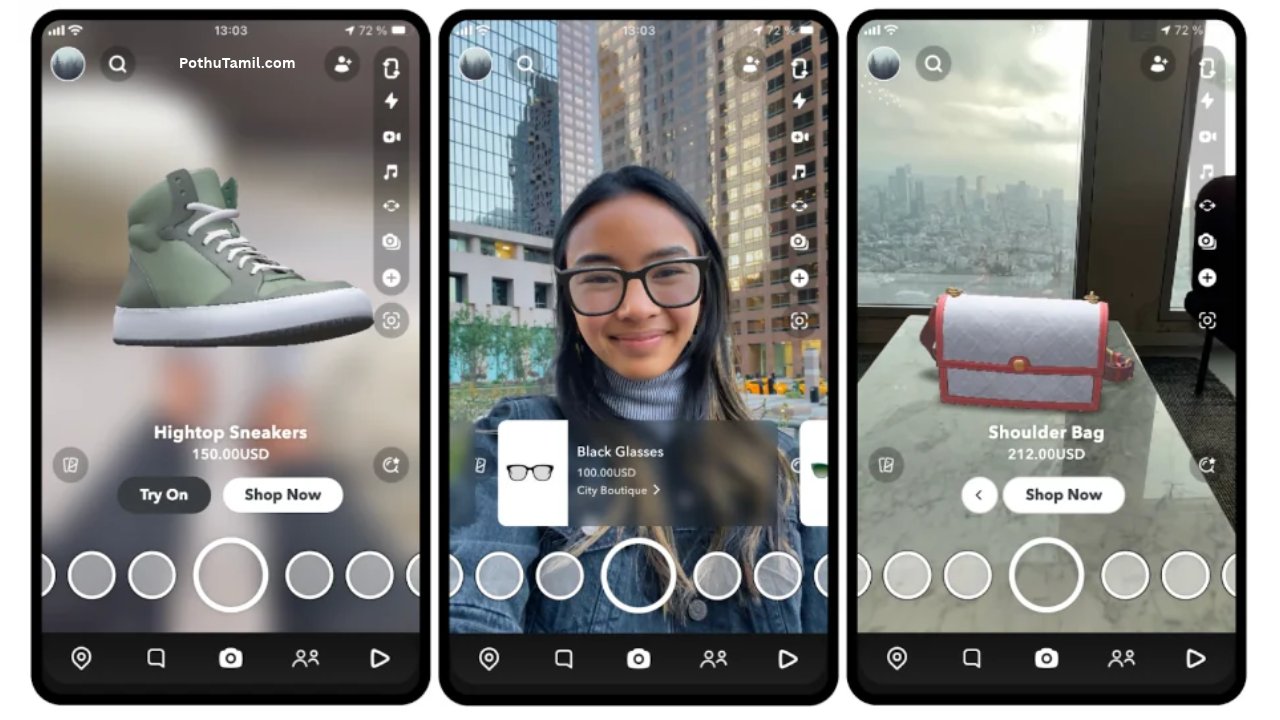
Snapchat Lens for Business and Marketing
Snapchat Lens technology provides opportunities for businesses that want to make their marketing campaigns more interactive.
Traditional advertisements generally communicate information through images, videos, and text. AR experiences allow users to interact with digital objects and explore virtual product representations.
Businesses can use branded Lenses to introduce products, encourage customer engagement, and create memorable advertising experiences.
Virtual Product Try-On
Virtual try-on experiences allow customers to preview selected products through their smartphone cameras.
For example, beauty brands can offer virtual makeup experiences, while accessory companies can create suitable digital product demonstrations.
These experiences can help customers explore products before making purchasing decisions.
Branded AR Advertising
Businesses can create branded Lenses featuring their logos, products, characters, and campaign themes.
Users may interact with these experiences and share the resulting content.
Snapchat offers Sponsored Lenses as an advertising format designed to create interactive AR experiences for consumers.
Shopping Experiences
AR shopping experiences can help customers visualize products and explore product features.
For example, a brand may develop an interactive experience that allows users to view a virtual product representation through their camera.
The available features depend on the business’s campaign setup and supported advertising options.
Influencer Marketing
Brands can collaborate with influencers and AR developers to introduce custom camera experiences.
For example, a fashion company might work with a content creator to develop an interactive Lens for a new product campaign.
Successful collaborations should focus on audience relevance, creative quality, and measurable marketing objectives.
Advertising Campaign Management
Businesses interested in running Snapchat advertising campaigns can explore the platform’s advertising solutions.
Snapchat’s business resources explain available advertising formats, Sponsored Lenses, and AR campaign options.
Visit Snapchat for Business – Sponsored Lenses to explore the advertising format and its business applications.
How Can Businesses Measure Snapchat Lens Performance?
Creating a branded Lens is only one part of an advertising campaign. Businesses should also measure how audiences interact with the experience.
Performance measurement helps marketers understand which creative elements attract attention and whether the campaign supports its objectives.
Important performance indicators can include:
| Metric | What it measures |
|---|---|
| Lens Views | Number of times the Lens is viewed |
| Shares | How frequently users share the experience |
| Captures | Snaps created using the Lens |
| Engagement | Interactions with the experience |
| Reach | Number of people exposed to the campaign |
| Conversions | Desired customer actions, when tracking is available |
Businesses should compare these measurements with their campaign objectives.
For example, a campaign designed to increase brand awareness may prioritize reach and engagement, while a product campaign may focus more on relevant customer actions.
A high number of views does not automatically mean a campaign has generated sales.
Can You Make Money by Creating Snapchat Lenses?
Creating Snapchat Lenses can provide professional opportunities for developers, designers, and creative professionals.
However, publishing a Lens does not automatically generate income.
Snapchat has offered creator monetization opportunities, including Lens Creator Rewards and Lens+ Payouts. These programs have eligibility requirements and specific conditions that creators must meet.
Different Ways AR Creators Can Earn Income
1. Eligible Creator Rewards
Creators may qualify for available Snapchat reward programs when their Lenses meet the relevant requirements.
2. Freelance AR Development
Businesses may hire developers to create custom AR experiences for marketing campaigns.
3. Branded Lens Projects
Professional designers can work with companies to develop interactive promotional experiences.
4. AR Design Services
Creators can offer 3D modelling, animation, graphic design, and AR development services.
5. Creative Agency Opportunities
Developers with strong portfolios may find opportunities with digital marketing agencies and creative studios.
Skills That Can Help AR Developers
- 3D modelling.
- Graphic design.
- Animation.
- Augmented reality development.
- JavaScript or TypeScript.
- Visual scripting.
- User experience design.
- Creative problem-solving.
These skills can be useful beyond Snapchat because AR development also applies to other mobile applications, advertising platforms, and interactive digital experiences.
Creators should review the current Lens Creator Rewards terms and availability before making financial plans based on potential earnings.
Snapchat Lens vs. Snapchat Filters: What Is the Difference?
Many people use the terms Snapchat Lens and Snapchat Filter interchangeably. However, they represent different camera experiences.
A traditional Snapchat Filter generally applies a visual overlay or adjustment to a captured image or video.
A Snapchat Lens provides a more interactive augmented reality experience. It can track facial features, introduce 3D objects, and transform appearances in real time.
| Comparison | Snapchat Lens | Snapchat Filter |
|---|---|---|
| Main purpose | Interactive AR effects | Visual overlays |
| Face tracking | Supported by suitable Lenses | Not generally required |
| 3D objects | Can include 3D elements | Usually simpler overlays |
| Animation | Can respond to movement | Depends on filter type |
| Interactivity | More advanced | Generally limited |
| Common use | AR experiences | Image decoration |
For example, an effect that places animated glasses on a moving face is a Lens experience. A simple color overlay that changes a photograph is closer to a traditional Filter.
Both features are useful, but Lenses provide more possibilities for interactive content creation.
Advantages and Disadvantages of Snapchat Lens
Snapchat Lenses offer creative opportunities, but users should also understand their limitations.
Advantages of Snapchat Lens
Easy Content Creation: Users can create entertaining photos and videos without professional editing experience.
Creative Freedom: Different effects allow users to experiment with appearances, animations, and virtual objects.
Interactive Experiences: Some Lenses respond to facial expressions and movements.
Business Opportunities: Brands can use AR experiences for product demonstrations and marketing campaigns.
Creator Opportunities: Developers can explore augmented reality as a professional skill.
Social Sharing: Users can share their creations through Snapchat’s available features.
Disadvantages of Snapchat Lens
Device Compatibility: Some advanced experiences may not work on older smartphones.
Internet Requirements: Certain Lenses need an internet connection to load.
Performance Issues: Complex effects can use additional processing resources and battery power.
Availability Changes: Some experiences may be removed or become unavailable.
Privacy Considerations: Camera-based experiences require users to understand permissions and sharing settings.
Learning Curve: Professional AR development may require knowledge of 3D design, animation, and programming.
Snapchat Lens Troubleshooting: Common Problems and Solutions
Sometimes Snapchat Lenses may not load correctly, track facial movements, or perform smoothly.
These problems can result from application settings, device compatibility, connectivity, or temporary technical issues.
Why Are Snapchat Lenses Not Loading?
If Lenses are not loading, check your internet connection first.
Try these solutions:
- Switch between Wi-Fi and mobile data.
- Close and reopen Snapchat.
- Update Snapchat through your device’s application store.
- Restart your smartphone.
- Try opening another Lens.
- Check whether the issue continues.
If only one Lens is affected, it may be temporarily unavailable or incompatible with your device.
Why Is Snapchat Lens Not Working on My Face?
Face Lenses depend on facial tracking. If the camera cannot detect important facial features, the effect may not work correctly.
Possible solutions include:
- Move to a brighter location.
- Keep your face visible to the camera.
- Remove objects covering important facial features.
- Position the camera at a suitable angle.
- Try another face Lens.
- Restart the application if necessary.
Good lighting can make facial tracking more reliable.
Why Are Some Snapchat Lenses Missing?
Not every Lens remains available permanently.
Some experiences may be temporary, while others may have device or regional restrictions.
Try searching through Lens Explorer, opening a Lens from a friend’s shared Snap, or using an available sharing link.
How to Fix Snapchat Lens Lag
Lens performance can depend on smartphone processing power, available memory, and the complexity of the AR experience.
To improve performance:
- Close unnecessary applications.
- Restart Snapchat.
- Check for application updates.
- Restart your device.
- Try a simpler Lens.
- Ensure your smartphone has sufficient available storage.
If the problem affects only one particular Lens, the issue may be related to that experience rather than your entire Snapchat application.
Why Is Snapchat Camera Not Working?
If the Snapchat camera does not open, check the camera permission settings on your device.
On Android and iPhone, application permissions can be managed through device settings.
Make sure Snapchat has permission to use the camera. If permission is already enabled, restart the application and check for updates.
Privacy and Security When Using Snapchat Lenses
Privacy is important when using camera-based social media applications.
Snapchat Lenses interact with camera input, so users should understand the permissions requested by the application and review its privacy settings.
Before sharing photographs or videos, check whether they reveal personal information, private surroundings, or sensitive details.
AI-powered visual effects also require responsible use. Some experiences can significantly change a person’s appearance, and generated images should not automatically be treated as accurate representations of reality.
Important Privacy Practices
- Review Snapchat’s camera permissions.
- Avoid sharing sensitive personal information.
- Check the audience before posting Snaps.
- Be careful when using third-party Lens sharing links.
- Avoid installing unofficial applications that promise additional Snapchat effects.
- Respect other people’s privacy when recording or sharing content.
- Use original or properly licensed assets when developing Lenses.
Businesses and professional creators should also follow applicable advertising, intellectual property, and platform content policies.
Snapchat Lens for Different Types of Users
Different people can use Snapchat Lenses for different purposes.
| User type | Recommended applications |
|---|---|
| Students | Creative videos and entertainment |
| Content creators | Interactive social media content |
| Influencers | Beauty and promotional experiences |
| Graphic designers | AR design experimentation |
| Developers | Custom AR development |
| Small businesses | Branded camera experiences |
| Retail companies | Virtual product demonstrations |
| Marketing agencies | Interactive advertising campaigns |
For beginners, simple face effects and creative Lenses are a good starting point.
People interested in professional opportunities can gradually explore Lens Studio, 3D design, and augmented reality development.
The Future of Snapchat Lens and Augmented Reality
Augmented reality is continuing to develop as smartphone cameras, artificial intelligence, computer vision, and 3D graphics improve.
Snapchat Lens technology is part of this wider development. Its applications extend beyond entertainment into shopping, education, communication, and business marketing.
More Advanced AI-Powered Lenses
Artificial intelligence may continue introducing new ways to create personalized visual experiences.
Developers can explore AI-assisted asset creation, visual transformations, and more sophisticated camera interactions.
Improved Virtual Shopping
AR shopping experiences can help customers visualize products before purchasing them.
Fashion, beauty, accessories, and retail businesses may find these experiences useful for improving online product discovery.
Better Interactive Experiences
Advances in tracking technology and 3D graphics can support more responsive camera experiences.
This may allow creators to develop detailed virtual environments, interactive games, and creative storytelling experiences.
More Opportunities for AR Developers
As businesses explore interactive advertising and virtual product demonstrations, developers with AR design and technical skills may find new professional opportunities.
However, success depends on the quality of their work, industry demand, and their ability to create experiences that provide genuine value.
Snapchat Lens technology is therefore worth exploring for anyone interested in digital creativity and augmented reality development.
Frequently Asked Questions About Snapchat Lens
1. What is a Snapchat Lens?
A Snapchat Lens is an augmented reality camera effect that allows users to transform their appearance, add animated objects, apply virtual makeup, and create interactive photographs and videos.
2. How do I get more Snapchat Lenses?
Open Snapchat, access the camera screen, and explore Lens Explorer. You can discover new effects, try different experiences, and save your favourite Lenses.
3. Is Snapchat Lens free to use?
Many Snapchat Lenses are available without an additional purchase. However, some experiences and features may have specific eligibility requirements or subscription restrictions.
4. Can I create my own Snapchat Lens?
Yes. You can use Snapchat’s Lens creation tools to develop personalized augmented reality experiences. Lens Studio provides more advanced development capabilities.
5. What is Lens Studio used for?
Lens Studio is Snapchat’s AR development platform. It allows creators to develop face effects, interactive games, 3D animations, virtual product experiences, and other camera effects.
6. Can I make money from Snapchat Lenses?
Eligible creators may participate in Snapchat’s available creator monetization programs. Other opportunities include freelance AR development, branded Lens projects, and professional design services. Earnings are not guaranteed.
7. Why are Snapchat Lenses not working?
Common reasons include poor internet connectivity, outdated applications, camera permission problems, device compatibility, and temporary technical issues. Updating Snapchat and restarting the application may help.
8. What is the difference between Snapchat Lens and Filter?
A Snapchat Lens provides interactive augmented reality effects, while a traditional Filter generally applies visual overlays or image adjustments. Lenses can support facial tracking, animation, and 3D experiences.
9. Can businesses use Snapchat Lenses for advertising?
Yes. Businesses can create branded AR experiences, virtual product demonstrations, and interactive advertising campaigns using Snapchat’s supported advertising tools.
10. Do Snapchat Lenses work on Android and iPhone?
Snapchat supports Android and iPhone devices. However, individual Lens compatibility can vary depending on the smartphone model, operating system, and supported features.
Conclusion
Snapchat Lens technology has changed the way people create and share visual content through social media. From face transformations and beauty effects to interactive games, AI-powered experiences, and 3D animations, Snapchat provides creative tools for different types of users.
With Lens Explorer, users can discover new camera effects, while Lens Studio gives developers the opportunity to build personalized augmented reality experiences. Businesses can also explore branded Lenses, virtual product demonstrations, and interactive advertising to connect with their audiences.
Professional creators can expand their skills through 3D modelling, graphic design, animation, and AR development. These skills can also open opportunities in freelance projects, digital marketing, and creative technology.
Whether you want to experiment with entertaining filters, develop custom camera effects, or explore business applications, Snapchat Lens offers several possibilities. As artificial intelligence and augmented reality continue to advance, Snapchat Lenses will remain an interesting technology for digital creativity, communication, and interactive content creation.