
Introduction
AI photo editing has changed the way people create couple portraits, social-media images, wallpapers, and personalized photographs. Instead of spending a long time adjusting every detail manually, modern AI photo-editing tools can help users transform an existing picture with changes to composition, background, lighting, clothing, colors, and overall visual style. Among the growing number of AI editing workflows, the prompt for Gemini photo editing approach has become popular with users who want more control over how an image should be transformed.
A couple photo is one of the most interesting use cases because the final result depends on more than simply applying a visual filter. The editing instruction needs to preserve important facial characteristics while improving the composition and creating a consistent visual style. Gemini-based image-editing workflows can therefore be useful for users who want to experiment with romantic portraits, cinematic photographs, travel-style couple images, traditional looks, or modern social-media designs without relying entirely on complicated professional editing software.
What Is Prompt for Gemini Photo Editing?
A prompt for Gemini photo editing is a written instruction that describes how an existing photograph should be modified. Instead of manually changing every editing parameter, the user can explain the intended result in natural language. Depending on the capabilities of the particular Gemini image workflow being used, the instruction can describe elements such as lighting, background, composition, clothing, colors, atmosphere, and photographic style.
For couple photography, this approach can be particularly convenient because the user can describe the overall appearance of the final image rather than trying to recreate the effect manually. The quality of the final output still depends on the source photograph, the image-editing capabilities available at the time, and how clearly the desired changes are described.
Why Couple Photo Editing Is Trending
Couple photographs are frequently used for profile pictures, wallpapers, social-media posts, invitations, anniversary memories, and personal digital albums. This has created strong interest in simple editing workflows that can turn an ordinary photograph into a more polished visual without requiring advanced graphic-design knowledge.
AI editing is attractive because users can experiment with different visual directions quickly. A single original photograph can potentially be adapted into several styles, such as a cinematic portrait, elegant studio photograph, outdoor travel scene, soft romantic composition, or premium editorial-style image. This flexibility is one of the major reasons AI-powered photo editing continues to attract both casual users and people who regularly create visual content.
Key Features to Look For
When evaluating an AI photo-editing workflow for couple photographs, image quality should not be the only consideration. A good editing experience should also make it reasonably easy to control the changes being requested while preserving important details from the original photograph.
Facial Detail Preservation
For couple portraits, preserving recognizable facial characteristics is especially important. An editing system that changes the overall appearance too aggressively may produce an attractive image but fail to maintain the identity and natural characteristics of the people in the original photograph.
Background and Composition Control
Background replacement and composition adjustments can make a major difference to a couple photograph. A simple background change can transform an ordinary indoor picture into a studio-style portrait, outdoor scene, or cinematic setting. However, realistic results depend on consistent lighting, perspective, shadows, and positioning.
Lighting and Color Enhancement
AI editing can also be useful for improving the visual atmosphere of a photograph. Warm lighting, softer highlights, balanced exposure, and coordinated colors can create a more polished appearance without completely changing the original composition.
Image Quality
Resolution and detail preservation matter when the finished photograph is intended for printing, wallpapers, portfolios, or high-quality social-media uploads. Users should check what image-quality options are available in the particular editing workflow before relying on it for professional output.
Prompt
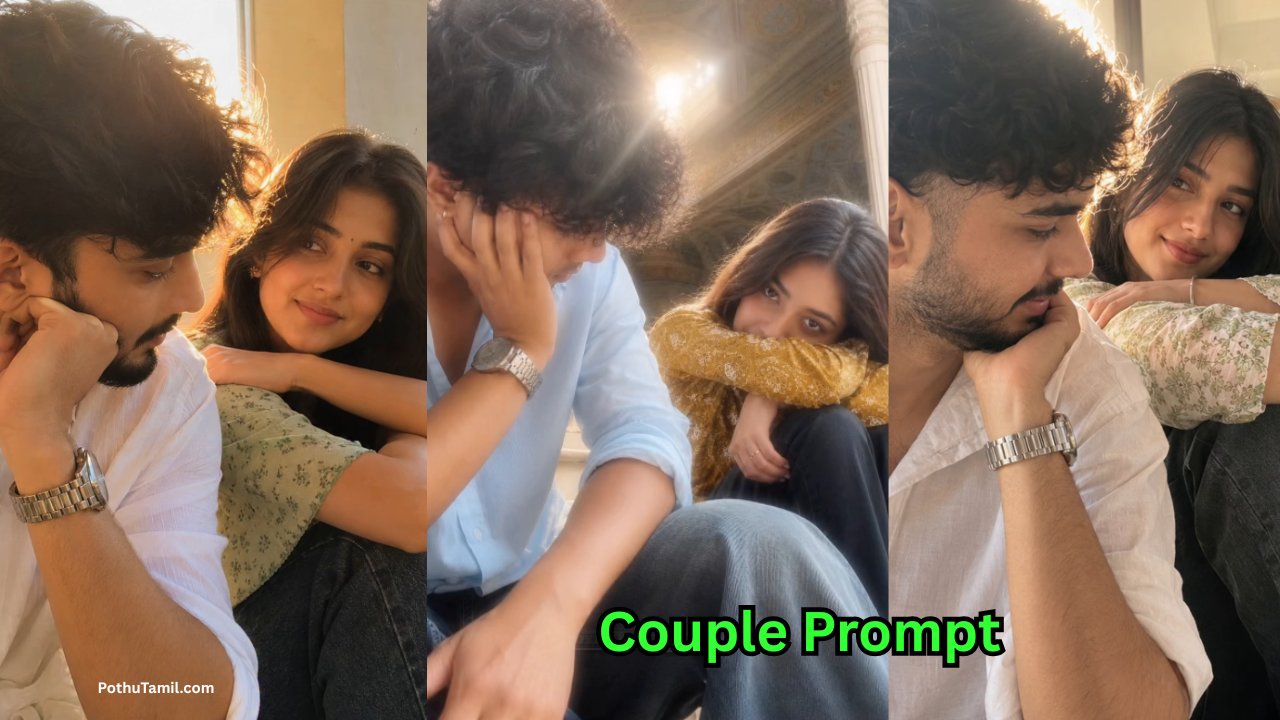
Create an ultra-realistic candid couple photograph using our uploaded photos as exact identity references. Recreate the reference image’s composition, low-angle 4:5 framing, seated pose, close body positioning, ornate historic architecture, warm sunlight, lens flare, and natural smartphone photography. Preserve our exact faces, skin tones, hairstyles, and proportions. Dress me in a sky-blue rolled-sleeve shirt and jeans, completely remove my tattoo. Dress my partner in a pretty mustard patterned top with dark pants. Natural anatomy, realistic skin, authentic fabric, soft warm colors, subtle romantic mood, no AI appearance.
Gemini Photo Editing vs Traditional Editing Software
Traditional photo-editing applications provide detailed control over individual elements such as layers, masks, color adjustments, curves, filters, and retouching. Professional editors can achieve highly precise results, but the learning curve can be significant for beginners.
AI-assisted editing takes a different approach. Instead of manually adjusting every setting, users can describe the intended transformation and allow the system to generate or modify the image accordingly. This can make experimentation faster, particularly for people who want creative results without learning a complete professional editing workflow.
| Editing Approach | Main Advantage | Best For |
|---|---|---|
| AI photo editing | Fast natural-language workflow | Quick creative edits |
| Traditional editor | Detailed manual control | Professional retouching |
| AI + manual editing | Speed with additional control | Advanced creative workflows |
For users who need pixel-level precision, conventional editing software may still be preferable. For quick creative experimentation, an AI workflow can be considerably more convenient.
Important Things to Check Before Using an AI Editing Tool
The quality of an AI image editor is only one part of the decision. Users should also consider privacy, account requirements, image retention, available export quality, usage limits, and whether premium features require a subscription or additional credits.
Privacy is especially important when editing personal couple photographs. Before uploading an image, users should review the service’s current privacy information and understand how uploaded photographs are processed. It is better to avoid submitting highly sensitive photographs when they are not necessary for the editing task.
Pricing is another practical consideration. Some AI photo-editing services offer basic functionality at no cost but place advanced image generation, higher resolution, additional editing capabilities, or increased usage limits behind paid plans. Comparing the available features against the actual editing requirements can help users avoid paying for capabilities they do not need.

How to Get Better Couple Photo Results
The original photograph plays an important role in the final result. A reasonably clear image with visible faces, adequate lighting, and a suitable composition generally gives an AI editing workflow more useful visual information to work with.
It is also helpful to have a clear idea of the intended result before starting the edit. Instead of requesting many unrelated changes at once, users can focus on the major visual elements they actually want to improve. This can make the editing process easier to evaluate and reduce the chance of producing an unnecessarily artificial-looking photograph.
Common Problems With AI Couple Editing
AI-generated or AI-edited photographs can sometimes introduce unwanted changes. Facial characteristics may be altered, hands or accessories may look unnatural, clothing details can change, and backgrounds may contain visual inconsistencies. These issues can become more noticeable when the original photograph is low quality or when the requested transformation is extremely complex.
Another common issue is over-editing. A photograph can look impressive while losing the natural characteristics that made the original image meaningful. For personal couple photographs, maintaining a realistic appearance is often more valuable than adding too many dramatic effects.
Privacy and Safe Usage
Personal photographs should be treated carefully when using online AI editing services. Before uploading a photograph, users should check the provider’s privacy policy, image-processing terms, and available controls for managing uploaded content. Different platforms may have different approaches to data retention and processing.
Users should also avoid using AI editing to create deceptive or harmful representations of real people. Editing your own photographs or images you have permission to modify is a straightforward use case. Respecting consent and privacy becomes particularly important when working with photographs of other people.
Is a Paid AI Photo Editor Worth It?
Whether a premium AI photo editor is worthwhile depends on how frequently it is used and what type of output is required. Someone who occasionally creates a couple wallpaper may be satisfied with basic editing capabilities, while a creator producing large numbers of high-resolution images may benefit from expanded usage limits and professional-oriented features.
Before purchasing a subscription, compare the available resolution, export options, editing limits, processing speed, privacy controls, and supported features. The most expensive plan is not necessarily the best option for every user. A service that provides the specific capabilities required for regular editing may offer better practical value than one with numerous unused features.
Final Review
The prompt for Gemini photo editing approach is an interesting option for users who want to transform couple photographs through natural-language instructions rather than relying completely on traditional manual editing. Its biggest advantage is convenience: users can describe a desired visual direction and experiment with different styles without needing extensive knowledge of professional editing controls.
For trending couple photographs, the approach can be useful for creating polished portraits, wallpapers, social-media images, and personalized memories. However, expectations should remain realistic. AI editing can sometimes modify facial details, introduce visual inconsistencies, or produce results that look less natural than expected. Reviewing the output carefully is therefore an important part of the workflow.
Overall, Gemini-style AI photo editing is worth exploring for users who prioritize creative flexibility and a simple editing process. Before choosing any AI photo-editing service, it is sensible to compare image quality, editing capabilities, privacy practices, pricing, usage limits, and export options. These factors are more important than simply choosing a tool because a particular editing style is trending.
For personal couple photography, the best result is usually one that improves the image while still preserving the natural appearance and character of the original photograph.
Photo edit
ANITHA
Banu