

Adobe Photoshop Elements is a photo editing software designed for photographers, content creators, and businesses that want professional-looking images without dealing with an overly complicated editing workflow. It combines AI-powered editing, automatic enhancements, creative effects, and guided editing tools in one application. Whether you want to restore old photographs, remove unwanted objects, improve portraits, or create commercial images, Adobe Photoshop Elements provides several useful features for different photography requirements.
What Is Adobe Photoshop Elements?
Adobe Photoshop Elements is a photo editing application developed by Adobe. It is designed to make photo editing accessible to beginners while providing creative tools for users who want more control over their images.
Unlike basic photo editing applications, Adobe Photoshop Elements includes AI-powered tools, automated corrections, guided editing experiences, and advanced editing options. Users can make quick improvements or explore more detailed adjustments depending on their experience.
The software also includes Elements Organizer, which helps users import, organise, tag, and find photographs. This can be particularly useful for photographers who manage large collections of personal or professional images.
Adobe Photoshop Elements is available as a separate application and can also be purchased in a bundle with Premiere Elements for users who need photo and video editing tools.
How Does Adobe Photoshop Elements Work?
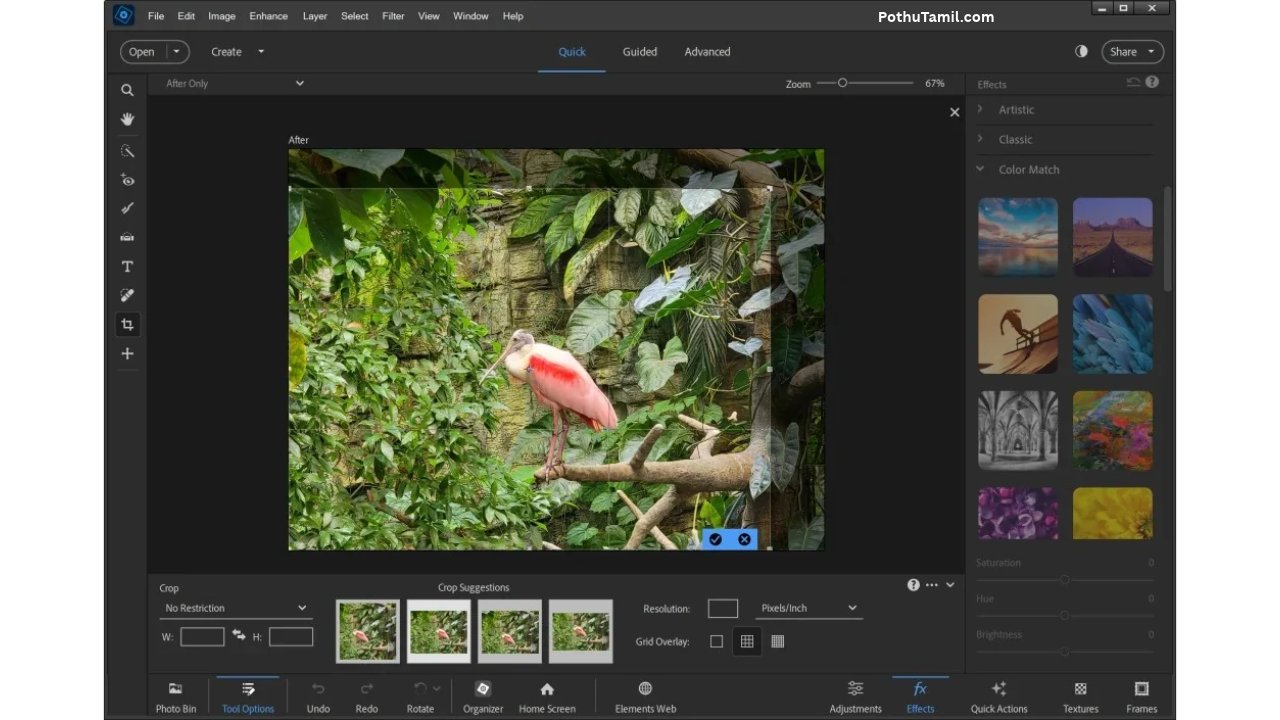
Adobe Photoshop Elements provides different editing modes to support different levels of experience. Users can start with Quick editing for simple corrections, explore Guided editing for step-by-step instructions, or use Advanced editing for greater creative control.
The Quick mode is suitable for common adjustments such as improving lighting, correcting colours, and making basic image improvements. Guided mode helps users understand specific editing techniques through instructions within the application.
Advanced mode provides access to more detailed editing controls for users who want to work on individual image elements and create more customised results.
This flexible workflow makes Adobe Photoshop Elements useful for people who are learning photo editing as well as experienced users who need convenient tools for everyday photography projects.
7 Powerful Adobe Photoshop Elements Photo Editing Features
1. AI-Powered Photo Editing
AI-powered editing is one of the important capabilities of Adobe Photoshop Elements. It helps users complete certain editing tasks with less manual effort.
The software includes AI-assisted features for improving photographs, removing distractions, and creating new visual elements. Depending on the available version, users can also generate images or add objects using written descriptions.
These capabilities can be useful for photographers and creative professionals who want to reduce repetitive editing work.
For example, a business preparing product photographs may need to remove unwanted background elements or improve the overall presentation of an image. AI-assisted editing can make some of these tasks easier.
2. Generative Expand and Image Enhancement
Generative Expand allows users to extend a photograph beyond its original edges by generating additional visual content.
This can be useful when an image needs more background space for a website banner, advertisement, or social media design. Instead of cropping important details, users can expand the photograph and create additional surrounding content.
Generative Upscale is another useful capability in the newer Elements release. It can help improve clarity and details in low-resolution photographs.
These tools are valuable for users who need to adapt existing images for different publishing formats. The final result should still be reviewed carefully to make sure generated details look natural and appropriate.
3. Remove Unwanted Objects and Background Distractions
Unwanted objects can reduce the quality of an otherwise useful photograph. People walking in the background, distracting objects, and unwanted visual elements can affect the final image.
Adobe Photoshop Elements includes tools designed to help users remove distractions and unwanted objects from photographs.
Users can also remove or replace backgrounds when they want to create a different visual presentation.
This feature can be useful for portrait photographers, product photography businesses, and marketing teams preparing images for commercial use.
For professional projects, users should inspect the edited area to ensure that the removal process does not leave visible errors or unnatural textures.

4. Professional Portrait Retouching
Portrait retouching is an important part of professional photography. Small improvements to lighting, facial details, and image appearance can help create more polished photographs.
Adobe Photoshop Elements provides portrait editing capabilities that help users improve their photographs without requiring a complex professional workflow.
Users can make suitable adjustments to facial details and overall image appearance. These tools can be helpful for editing personal portraits, business headshots, wedding photographs, and professional photography projects.
The best approach is to maintain natural-looking results. Excessive retouching can make faces appear unrealistic, so adjustments should be made carefully.
5. Guided Edits for Creative Projects
Guided Edits are useful for people who want to learn photo editing techniques without having to understand every tool immediately.
Adobe Photoshop Elements provides step-by-step editing experiences for different creative tasks. These can help users combine photographs, improve colours, correct lighting, create effects, and experiment with different visual styles.
This makes the application suitable for beginners who want to develop their editing skills.
Professional users can also benefit from guided workflows when they need to complete a specific creative task quickly.
6. Creative Templates, Collages, and Photo Projects
Adobe Photoshop Elements provides creative options for users who want to turn photographs into finished designs.
Users can create photo collages, slideshows, and other visual projects. Templates can also help them prepare designs for social media posts, promotional materials, and personal photography collections.
These tools can be useful for content creators and small businesses that need attractive visual materials without building every design from the beginning.
For more specialised marketing and design requirements, users can also explore Adobe Express and other professional creative tools within Adobe’s ecosystem.
7. Elements Organizer for Photo Management
Organising photographs is an important part of maintaining an efficient editing workflow. When image collections grow, finding specific photographs can become difficult.
Elements Organizer helps users import, tag, sort, and manage their photo collections. It also provides ways to find images using supported search and organisation features.
This can be valuable for photographers who manage client photographs, family collections, product images, or marketing assets.
Keeping photographs organised can reduce the time spent searching for files and make it easier to manage ongoing photography projects.
Adobe Photoshop Elements for Professional Photography
Professional photographers need editing software that can support consistent image quality and efficient workflows.
Adobe Photoshop Elements can be useful for portrait photographers, wedding photographers, content creators, and small photography businesses that need practical editing tools.
Portrait photographers can use its retouching capabilities to refine photographs. Wedding photographers can use creative tools to prepare albums and photo projects. Commercial photographers can use background editing and object removal to improve selected images.
However, photographers who require extensive professional compositing, advanced colour workflows, or complex layer-based editing may need to compare Adobe Photoshop and other specialised applications before selecting their primary editing software.
Adobe Photoshop Elements for Business and Commercial Images
Businesses use photographs for websites, product catalogues, online stores, advertising campaigns, and marketing materials.
Adobe Photoshop Elements can support these activities by helping users improve product photographs, remove unwanted distractions, adjust image appearance, and create promotional designs.
E-commerce businesses may use photo editing to maintain consistent product presentation. Marketing teams can prepare visual content for campaigns, while small businesses can create promotional images without depending on a complicated editing workflow.
For organisations with larger creative teams, software selection should also consider licensing, user requirements, storage, and the complexity of the editing work.
Adobe Photoshop Elements 2027 Pricing and Licence
Adobe Photoshop Elements 2027 is offered with a three-year term licence. Unlike a continuously renewing monthly subscription, the licence is purchased as a one-time payment and does not automatically renew.
The three-year term begins after redemption. When the licence expires, the Photoshop Elements application is no longer accessible, although the media catalogue in Elements Organizer remains accessible indefinitely.
Adobe also provides a free, full-featured seven-day trial so users can explore the software before purchasing.
The price depends on the country, available offers, and applicable taxes. Users in India should check Adobe’s official India store for the latest pricing rather than relying on older prices or promotional offers.
Users who also need video editing can compare the Photoshop Elements and Premiere Elements bundle. It combines the photo editing application with Premiere Elements for supported video editing workflows.
You can review the current application and purchasing options on the official Adobe Photoshop Elements website.
Adobe Photoshop Elements vs Adobe Photoshop
Adobe Photoshop Elements and Adobe Photoshop are designed for different editing requirements.
Photoshop Elements focuses on accessible photo editing, AI-assisted tools, automated improvements, and guided creative workflows. It can be suitable for beginners, hobby photographers, and small businesses that need practical image editing capabilities.
Adobe Photoshop is designed for more extensive professional image editing and creative production. It offers a broader set of tools for complex compositions, detailed retouching, graphic design, and advanced image manipulation.
Users who mainly edit photographs and want guided workflows may find Photoshop Elements suitable. Creative professionals who require more advanced control should compare the full Photoshop application and its subscription options.
The best choice depends on the type of images being edited, the required features, and the user’s budget.
Tips for Getting Better Results with Adobe Photoshop Elements
A good photo editing workflow starts with selecting a suitable original image. Before applying effects or automated corrections, review the photograph’s lighting, sharpness, colours, and overall quality.
Use AI-powered tools when they genuinely improve the image, but always review the generated or edited areas. Unwanted visual changes can sometimes affect image realism.
For portrait photography, maintain natural skin tones and avoid excessive retouching. For commercial product images, preserve accurate colours and details so customers can understand the actual appearance of the product.
Save original photographs separately and maintain suitable backups, particularly when working with important client or business projects.
Learning the Quick, Guided, and Advanced editing modes can also help users develop a more efficient workflow over time.
Conclusion
Adobe Photoshop Elements combines AI-powered photo editing, background removal, image enhancement, portrait retouching, Guided Edits, creative templates, and photo organisation tools in one application. These features make it a practical option for beginners, photographers, content creators, and small businesses that need accessible photo editing software.
Before purchasing, users should compare the three-year licence, included features, system requirements, and available alternatives such as Adobe Photoshop. Choosing the right application depends on the complexity of the editing work and the level of creative control required.
With its combination of automated tools and guided editing features, Adobe Photoshop Elements can help users improve photographs and create professional-looking visual projects.